
Payment Options for a Parking Penalty
Payment options
How to Pay a Parking Penalty
By postal money order / yellow cheque found on the vehicle
The cheque must be completed by the driver of the vehicle. The amount payable can be found in the relevant section of the notice. When determining the amount, please take the time of payment into account.
In this case, the driver has no further obligation after payment, as the payment data will be automatically entered into the system.
By bank transfer
Beneficiary: Municipality of Belváros-Lipótváros
Account number: 11784009-15505006-10290006
SWIFT: OTPVHUHB
IBAN: HU88
Please indicate the surcharge identification number and the registration number of the vehicle concerned in the payment reference field. Without these details, the payment cannot be identified.
At the cash desk of the Customer Service Office
1054 Budapest, Podmaniczky Frigyes tér 6.
Cash desk opening hours:
Monday to Friday, from 9:00 to 12:20 and from 13:00 to 16:00.
Online Payment by bank card
Unfortunately, the online payment interface is available in Hungarian only, so we illustrate the payment process with explanatory images.
To start the surcharge payment, please click on the link below.
STEP 1
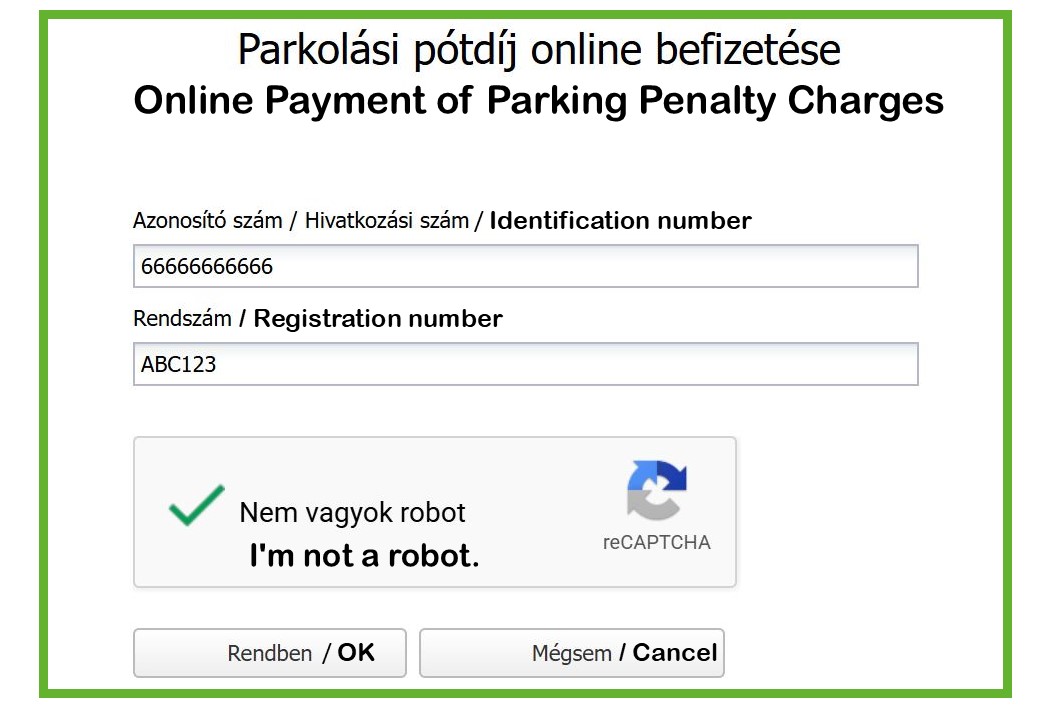
After clicking tthe START button, first enter the Identification Number shown on the Parking Penalty notice placed in the red plastic pouchon on the vehicle’s windscreen, as well as the Registration Number of the surcharged vehicle. (As you can see in the screenshot below.)
STEP 2
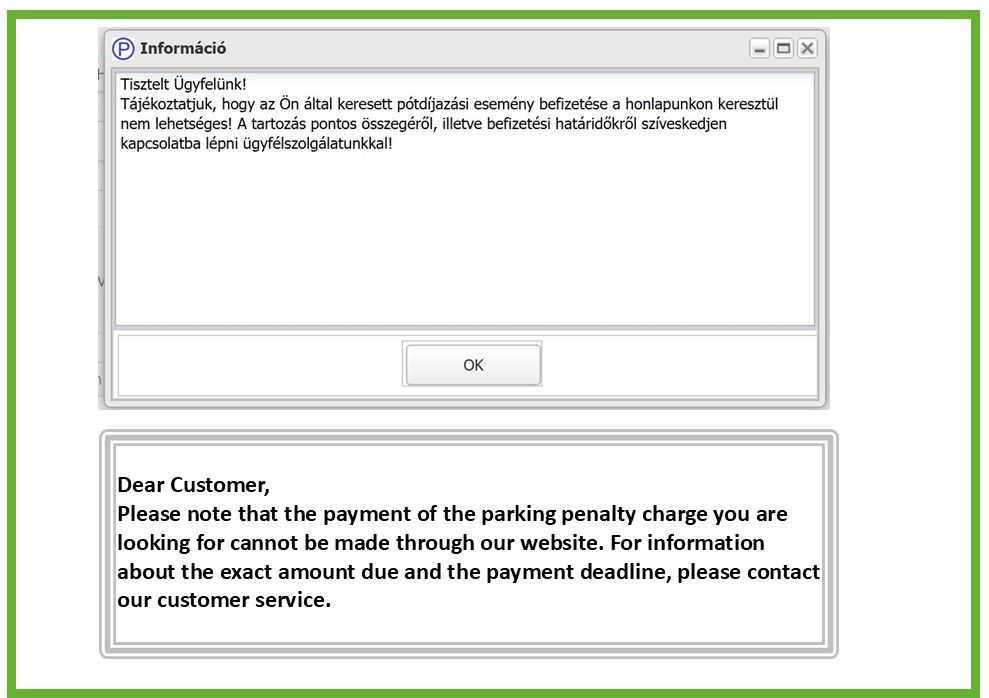
If the surcharge has already been transferred for foreign debt recovery, it can no longer be paid through this online payment interface.
STEP 3
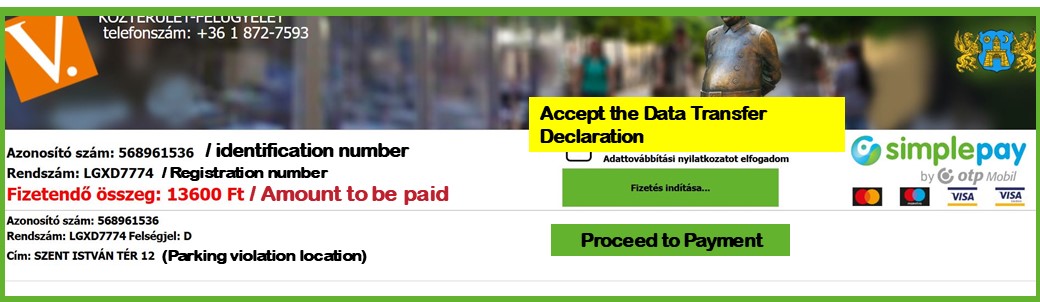
After entering the page, please check the details of the surcharge event you wish to pay.
After entering the page, please check the details of the surcharge event you wish to pay.
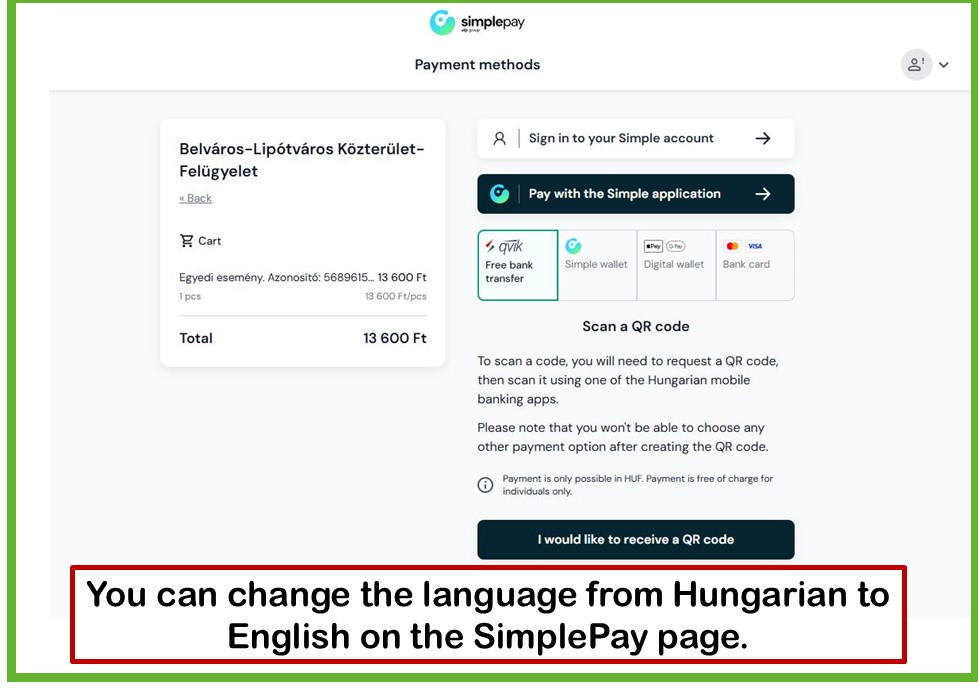
After accepting the Data Transfer Declaration, click the Start Payment button. You will then be redirected to the SimplePay payment page, where you can start the transaction by entering your bank card details.
STEP 4
The bank card payment process
After entering your card details, please check that they are correct, then click the Pay button. The transaction will then be processed by the banking systems. You will receive confirmation of the successful payment, and your payment will be automatically recorded for the surcharge event.
Accepted bank card types: Mastercard, Maestro, Visa, Visa Electron, American Express
Please note: In the case of Maestro and Visa Electron cards, the issuing bank determines whether the card can be used for online payments. If the issuing bank has enabled this function, our system can accept the card.
Parking surcharge recovery
It is advisable to pay the surcharge found on the vehicle within 15 days from the date on which the surcharge was imposed.
See the Tariffs and Surcharges menu item.
In the case of vehicles with foreign registration plates, the administrative costs incurred during the recovery of the parking surcharge vary by country and differ from the administrative costs applicable in Hungary.
Any costs incurred during the recovery of the parking surcharge shall in all cases be borne by the operator of the vehicle.
Additional documents
Before proceeding to the online payment interface, please read the following documents:
Data Transfer Declaration
I acknowledge that the following personal data stored in the user database of https://ugyfelablakparkolas.blkf.hu by Belváros-Lipótváros Budapest Capital District V Municipality Public Area Supervision (1054 Budapest, Bajcsy-Zsilinszky út 34), as data controller, will be transferred to OTP Mobil Kft. as data processor.
The scope of the data transferred by the data controller is as follows:
MerchantID (data related to the SP account); SecretID (data related to the SP account); name of the software (Atlasz ParkinfoWeb + current version number); CustomerEmail (BLKF customer service email address); Language (HU – fixed); Method (payment method – CARD – fixed); BackrefURL (the address to which the successful payment response is expected).
Per item: product name, e.g. individual event; identifier; label: parking surcharge; quantity: 1; amount.
The nature and purpose of the data processing activity carried out by the data processor are described in the SimplePay Privacy Notice, available at the following link:
SimplePay User Information